ReadyTools Workspace
Desde notas rápidas hasta proyectos completos.
Escribe, organiza, colabora y publica desde un espacio de trabajo seguro que crece con tu trabajo.
Diseñado para notas, archivos, proyectos, investigación, ayuda de IA y trabajo compartido.
Casos de uso
Usa Workspace para trabajo real, no solo para notas.
Desde lanzamientos hasta páginas de estudio, Workspace le da a cada proyecto un lugar para crecer.
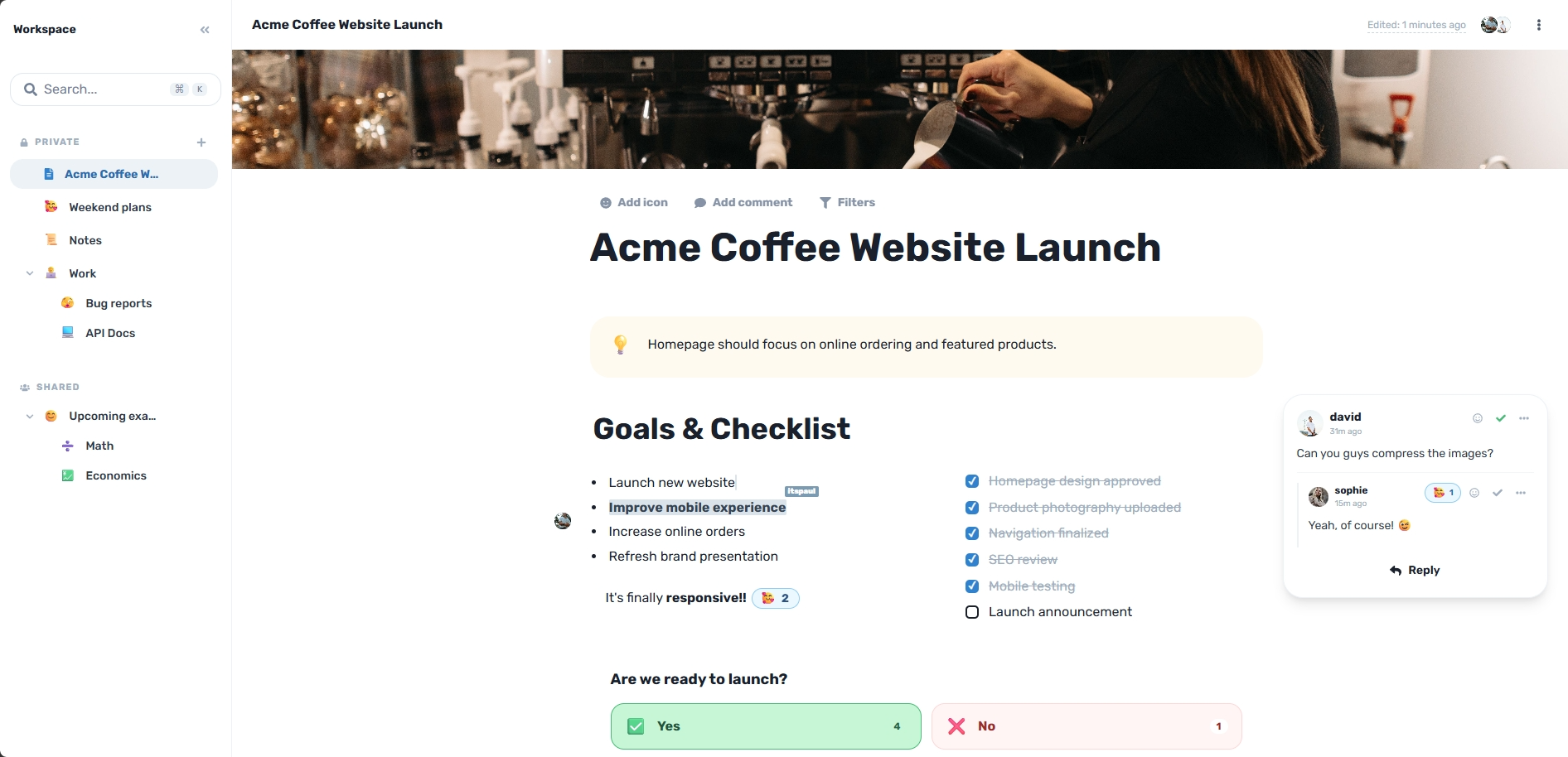
Lanzamientos de productos
Planifica objetivos, tareas, archivos, retroalimentación y decisiones de lanzamiento en una sola página.
Notas de estudio
Mantén las lecciones, videos, recursos, resúmenes y explicaciones de IA juntos.
Proyectos de equipo
Colabora en documentos, planes de proyecto, retroalimentación y decisiones en tiempo real.
Investigación
Recopila fuentes, ideas, hallazgos, archivos y contexto sin perder el hilo.
Planificación de viajes
Organiza mapas, itinerarios, reservas, notas, archivos y planes compartidos juntos.
Proyectos personales
Planifica renovaciones, eventos, proyectos paralelos, objetivos y tareas cotidianas con claridad.
El problema
El trabajo se vuelve caótico cuando empieza a crecer.
Una simple nota se convierte en archivos, investigaciones, capturas de pantalla, comentarios, chats de IA, tareas y decisiones. La mayoría de las herramientas separan esas piezas. Workspace las mantiene conectadas.
Antes de Workspace
DesconectadoNotas
Archivos
Chats de IA
Comentarios
Enlaces
Con Workspace
SincronizadoUn espacio de trabajo conectado
Todo se queda dentro de la página
Las notas, los archivos, las decisiones y el contexto permanecen juntos.
Lara te ayuda dentro del documento, no en un hilo de chat separado.
El trabajo terminado puede convertirse en un Sitio de Workspace público cuando sea necesario.
Flujo de trabajo
Tu espacio de trabajo crece con tu trabajo.
Empieza con una nota y luego sigue construyendo en el mismo lugar. No necesitas reconstruir el trabajo en otro lugar cuando se vuelve serio.
Captura
Escribe una nota rápida, idea, plan o primer borrador antes de que la estructura esté clara.
Organiza
Convierte notas generales en encabezados, tareas, tablas, secciones y páginas limpias.
Añade contexto
Adjunta archivos, investigaciones, elementos multimedia, incrustaciones, diagramas y datos al lado del trabajo.
Colabora
Informa a personas, editen juntos, dejen comentarios y controla quién puede ver o editar.
Publica
Comparte páginas terminadas seleccionadas como Sitios de Workspace limpios sin tener que reconstruirlas.
Chat del Workspace
Un chat que mantiene el trabajo en marcha.
Habla con tu equipo dentro del contexto, incorpora a Lara y convierte las decisiones en acciones seguras y revisables.
Chat con contexto
Mantén cada decisión junto a la página, el bloque o el proyecto al que pertenece.
Alcance de página y sitio
Pasa de una página a todo el Workspace sin perder el hilo.
Archivos cifrados de Vault
El texto del chat usa el cifrado de Workspace, mientras que las imágenes y los archivos mantienen el cifrado de Vault.
Acciones de Lara
Pide a Lara que investigue o prepare cambios y revísalos antes de aplicarlos.
Chat del equipo
Privado · en directo
Hoy
Sarah
La sección de configuración es útil, pero no explica qué hacer después de terminar una revisión.
Bastaría con un breve párrafo práctico bajo la sección.
Nóra
@Lara¿Puedes añadir un párrafo claro sobre los siguientes pasos después de terminar una revisión?
Lara
AI
Lara está trabajando…
Leí la sección actual de la página
Usé la solicitud explícita como guía de redacción
Preparé un párrafo para revisar
Escribe un mensaje…
Activos del proyecto
Encriptado AES-256 • 12 Archivos
Paquete_investigación.pdf
Referencia PDF
Concepto_principal.png
Referencia de imagen
Nota_de_voz.webm
Grabación de audio
Requisitos.docx
Documento de proyecto
Arrastra archivos para subir
Protegido por AES-GCM-256
Vault encriptado
Almacenamiento de archivos seguro, integrado desde cero
Mantén tus PDFs, documentos, imágenes y archivos de audio a salvo. Vault se integra directamente con tu espacio de trabajo, almacenando todo con encriptación AES-256.
Almacenamiento encriptado AES-GCM-256 para todos los activos de tu proyecto.
Incrusta archivos, videos e imágenes directamente en las páginas de tu espacio de trabajo.
Comparte archivos públicamente con tu equipo sin usar herramientas de archivo separadas.
Modo multijugador
Trabajen juntos, en tiempo real
Mira exactamente quién está escribiendo, seleccionando o editando hasta el nivel de bloque. Tu equipo se mantiene perfectamente sincronizado sin necesidad de refrescar.
Activos en el documento
Sophie, David and itspaul are editing now
Plan de lanzamiento del Q3
Edición en tiempo real
Trabaja en la misma página con otros sin tener que enviarse borradores de un lado a otro.
Comentarios y retroalimentación
Discute el trabajo justo al lado del contenido exacto de la página que requiere atención.
Permisos de visualización y edición
Controla quién puede leer, comentar o modificar páginas importantes del espacio de trabajo.
Acceso a páginas y espacios de trabajo
Comparte ampliamente a nivel de espacio de trabajo o mantén las páginas sensibles más restringidas.
Plantillas
No empieces desde una página en blanco.
Usa estructuras de página listas para usar en trabajos reales, luego adáptalas a medida que el proyecto crezca.
Incluye 25 plantillas listas para usar.
Sala de lanzamiento (Launch Room)
Planifica objetivos, recursos, tareas, progreso, riesgos y decisiones finales de lanzamiento.
Especificación de ingeniería
Documenta requisitos, arquitectura, notas de API, código y preguntas abiertas.
Reporte de errores (Bug Report)
Captura pasos de reproducción, registros, gravedad, responsable y lista de verificación de corrección.
Página de estudio
Recopila lecciones, recursos, notas, videos y comprobaciones de comprensión.
Reporte analítico
Revisa KPIs, gráficos, meglataciones, decisiones y siguientes acciones.
Planificador de viajes
Conserva mapas, clima, fechas, equipaje, detalles de la ruta y enlaces juntos.
Confianza
Diseñado para proteger tu trabajo.
Workspace está diseñado para proyectos reales, notas privadas, páginas de equipo y para compartir públicamente con controles que mantienen el contenido adecuado en el lugar correcto.
Almacenamiento encriptado
El contenido de Workspace se almacena con encriptación para que el trabajo privado se maneje con cuidado.
Permisos basados en roles
Otorga a las personas el nivel de acceso adecuado para ver, editar y gestionar páginas.
Controles de publicación seguros
Publica solo las páginas seleccionadas, para que el contenido privado del espacio de trabajo se mantenga separado.
Protección de recuperación
Las salvaguardas integradas ayudan a proteger las páginas contra sobrescrituras accidentales, ya sean totales o parciales.
Sitios de Workspace
Cuando el trabajo esté listo, compártelo.
Convierte páginas seleccionadas del espacio de trabajo en sitios públicos sin tener que reconstruir el contenido en otro lugar.
Páginas públicas
Compartición lista para SEO
Visor limpio
Solo páginas seleccionadas
Preguntas frecuentes
Todo lo que necesitas saber sobre el espacio de trabajo de ReadyTools.
Empieza con una nota. Construye todo el proyecto.
Workspace mantiene tus notas, archivos, ayuda de IA, colaboración y publicación conectados desde la primera idea hasta la página final.
Sin desorden. Sin reconstrucción. Solo un espacio de trabajo que crece con tu trabajo.