ReadyTools Workspace
From quick notes to complete projects.
Write, organize, collaborate, and publish from one secure workspace that grows with your work.
Built for notes, files, projects, research, AI help, and shared work.
Use cases
Use Workspace for real work, not just notes.
From launches to study pages, Workspace gives every project a place to grow.
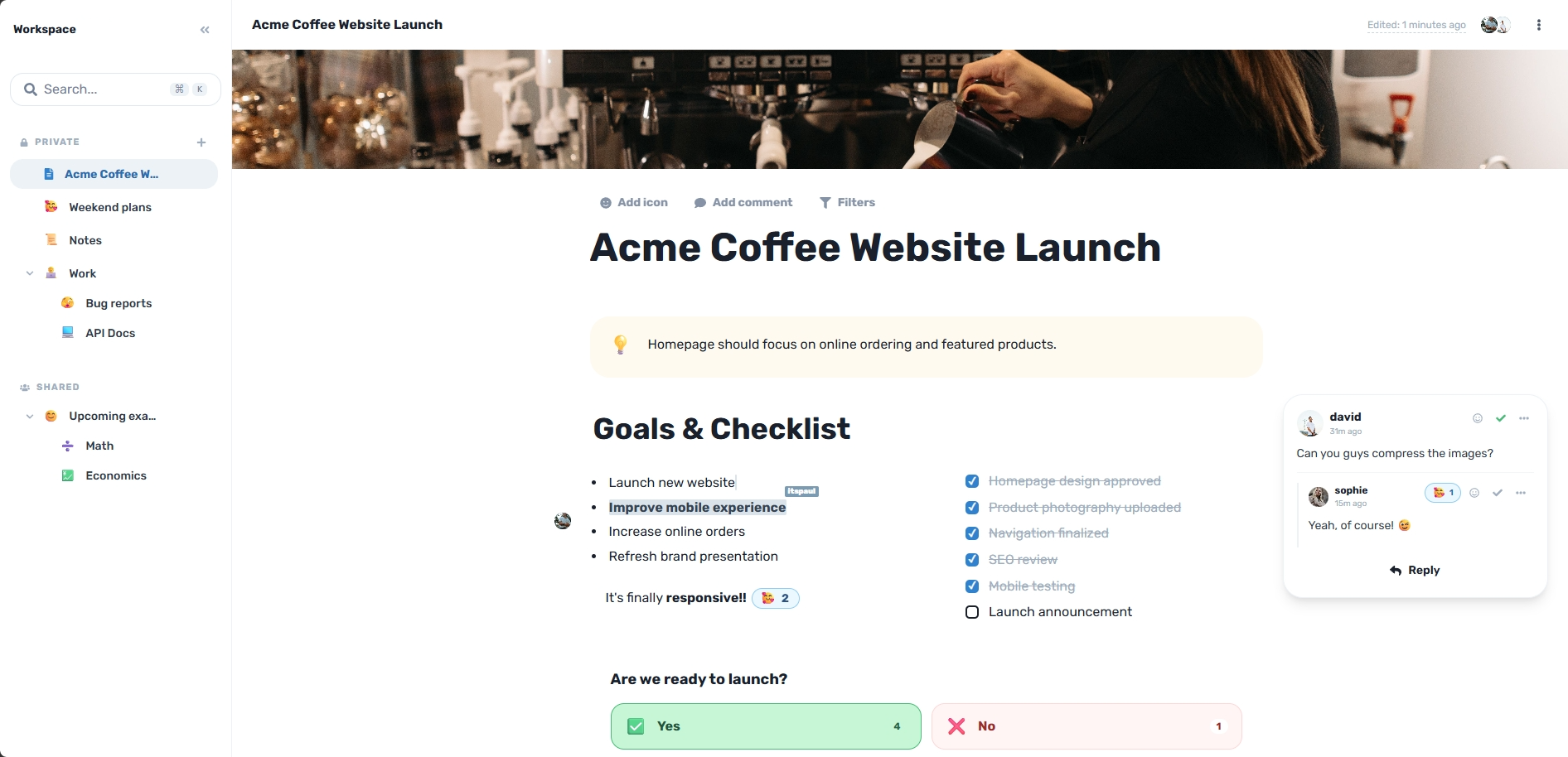
Product launches
Plan goals, tasks, files, feedback, and launch decisions in one page.
Study notes
Keep lessons, videos, resources, summaries, and AI explanations together.
Team projects
Collaborate on documents, project plans, feedback, and decisions in real time.
Research
Collect sources, ideas, findings, files, and context without losing the thread.
Travel planning
Organize maps, itineraries, bookings, notes, files, and shared plans together.
Personal projects
Plan renovations, events, side projects, goals, and everyday projects clearly.
The problem
Work gets messy when it starts growing.
A simple note becomes files, research, screenshots, comments, AI chats, tasks, and decisions. Most tools force those pieces apart. Workspace keeps them connected.
Before Workspace
DisconnectedNotes
Files
AI chats
Feedback
Links
With Workspace
In SyncOne connected workspace
Everything stays with the page
Notes, files, decisions, and context stay together.
Lara helps inside the document, not in a separate chat trail.
Finished work can become a public Workspace Site when needed.
Workflow
Your workspace grows with your work.
Start with a note, then keep building in the same place. You do not need to rebuild the work somewhere else when it becomes serious.
Capture
Write a quick note, idea, plan, or first draft before the structure is clear.
Organize
Turn rough notes into headings, tasks, tables, sections, and clean pages.
Add context
Attach files, research, media, embeds, diagrams, and data next to the work.
Collaborate
Invite people, edit together, leave feedback, and control who can view or edit.
Publish
Share selected finished pages as clean Workspace Sites without rebuilding them.
Workspace chat
A chat that keeps the work moving.
Talk with your team in context, bring Lara into the conversation, and turn decisions into safe, reviewable actions.
Chat in context
Keep every decision next to the page, block or project it belongs to.
Page and site scopes
Move from one page to the entire workspace without losing the thread.
Encrypted files from Vault
Chat text uses Workspace encryption, while images and files keep their Vault encryption.
Lara actions
Ask Lara to research or prepare changes, then review them before anything is applied.
Team chat
Private · live
Today
Sarah
The setup section is useful, but it does not explain what to do after a review is complete.
A short practical paragraph under the section would be enough.
Nóra
@LaraCan you add a clear paragraph about the next steps after a completed review?
Lara
AI
Lara is working…
Read the current page section
Used the explicit request as the writing brief
Prepared one paragraph for review
Write a message…
Project Assets
AES-256 Encrypted • 12 Files
Research packet.pdf
PDF reference
Hero concept.png
Image reference
Voice note.webm
Audio recording
Requirements.docx
Project document
Drop files to upload
Protected by AES-GCM-256
Encrypted Vault
Secure file storage, built right in
Keep your PDFs, documents, images, and audio files safe. The Vault integrates directly with your workspace, storing everything with AES-256 encryption.
AES-GCM-256 encrypted storage for all your project assets.
Embed files, videos, and images directly into your workspace pages.
Share files publicly with your team without using separate file tools.
Multiplayer Mode
Work together, in real-time
See exactly who is typing, selecting, or editing down to the block level. Your team stays perfectly in sync without ever needing to hit refresh.
Active in document
Sophie, David and itspaul are editing now
Q3 Launch Plan
Realtime editing
Work on the same page with others without passing drafts back and forth.
Comments and feedback
Discuss the work next to the exact page content that needs attention.
View and edit permissions
Control who can read, comment, or change important workspace pages.
Workspace and page access
Share broadly at workspace level or keep sensitive pages more limited.
Templates
Do not start from a blank page.
Use ready-made page structures for real work, then adapt them as the project grows.
25 ready-made templates included.
Launch Room
Plan goals, assets, tasks, progress, risks, and final launch decisions.
Engineering Spec
Document requirements, architecture, API notes, code, and open questions.
Bug Report
Capture repro steps, logs, severity, owner, and fix checklist.
Study Page
Collect lessons, resources, notes, videos, and comprehension checks.
Analytics Report
Review KPIs, charts, insights, decisions, and next actions.
Travel Planner
Keep maps, weather, dates, packing, route details, and links together.
Trust
Built to protect your work.
Workspace is designed for real projects, private notes, team pages, and public sharing with controls that keep the right content in the right place.
Encrypted storage
Workspace content is stored with encryption so private work is handled with care.
Role-based permissions
Give people the right level of access for viewing, editing, and managing pages.
Safe publishing controls
Publish selected pages only, so private workspace content stays separate.
Recovery protection
Built-in safeguards help protect pages from accidental empty or partial overwrites.
Workspace Sites
When the work is ready, share it.
Turn selected workspace pages into public Workspace Sites without rebuilding the content elsewhere.
Public pages
SEO-ready sharing
Clean viewer
Selected pages only
Solutions
Pick the problem you came to solve
Workspace does a lot. These guides start from one real problem and show exactly how it helps.
A Notion alternative
Pages and blocks like Notion, plus encryption before storage, Lara AI and Vault files built in.
Encrypted notes
Keep contracts, client details and personal notes private, then share a single page safely.
Publish notes as a website
Turn finished pages into a clean public site with navigation, search and SEO settings.
AI note taking
Research the web, summarize and write with Lara AI inside every page.
Team wiki
One knowledge base for onboarding, processes and docs, edited together in real time.
Project management
Docs, Kanban boards, assigned tasks and reminders around one page.
Frequently asked questions
Everything you need to know about ReadyTools Workspace.
Start with a note. Build the whole project.
Workspace keeps your notes, files, AI help, collaboration, and publishing connected from the first idea to the final page.
No clutter. No rebuilding. Just one workspace that grows with your work.